

How Mollak Works?
كيف يعمل نظام مُلاك؟
How Mollak Works ?كيف يعمل نظام مُلاك؟
A complete process of Mollakالعملية الكاملة لنظام مُلاك

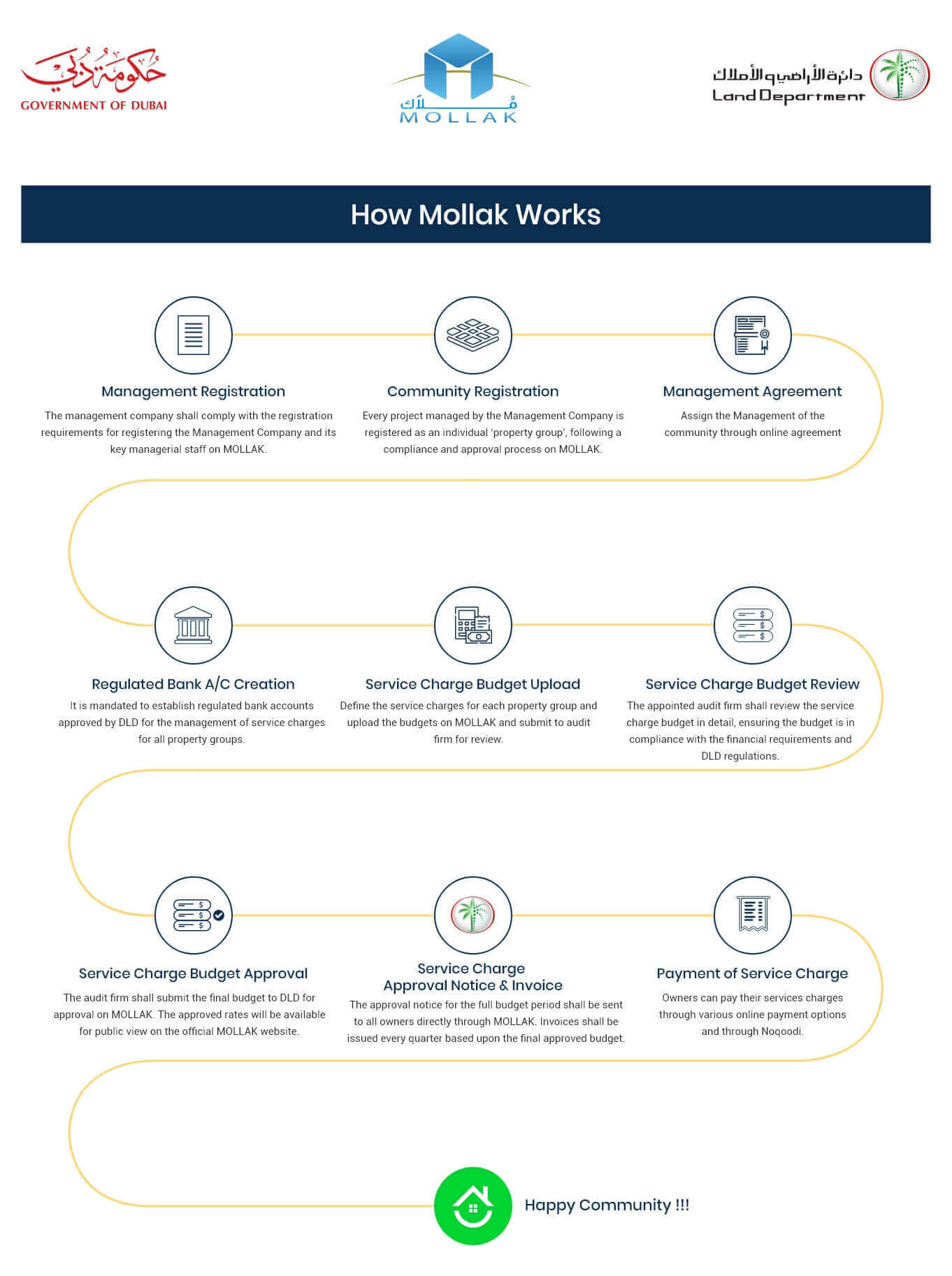
Step 1
Management Registration
The management company shall comply with the registration requirements for registering the Management Company and its key managerial staff on Mollak.

Step 2
Community Registration
Every project managed by the management company is registered as an individual ‘property group’, following a compliance and approval process on Mollak.

Step 3
Management Agreement
Assign the Management of the community through online agreement

Step 4
Regulated Bank A/C Creation
It is mandated to establish regulated bank accounts approved by DLD for the management of service charges for all property groups.

Step 5
Service Charge Budget Upload
Define the service charges for each property group and upload the budgets on Mollak and submit to audit firm for review.

Step 6
Service Charge Budget Review
The appointed audit firm shall review the service charge budget in detail, ensuring the budget is in compliance with the financial requirements and DLD regulations.

Step 7
Service Charge Budget Approval
The audit firm shall submit the final budget to DLD for approval on Mollak. The approved rates will be available for public view on the official Mollak website.

Step 8
DLD Service Charge Approval Notice & Invoice
The approval notice for the full budget period shall be sent to all owners directly through Mollak. Invoices shall be issued every quarter based upon the final approved budget.

Step 9
Payment of Service Charge
Owners can pay their services charges through various online payment options and through Noqodi.
الخطوة 1
تسجيل شركة الإدارة
تلتزم شركة الإدارة بمتطلبات التسجيل الخاصة بتسجيل شركة الإدارة وموظفيها الإداريين الرئيسيين في نظام مُلاك
الخطوة 2
تسجيل المجمع
يتم تسجيل كل مشروع تديره شركة الإدارة بمثابة مجموعة عقارات فردية، بعد عملية الامتثال والموافقة في مُلاك.
الخطوة 3
اتفاقية الإدارة
تعيين إدارة المجمع من خلال اتفاق عبر الإنترنت
الخطوة 4
حساب البنك المنظم
من الضروري إنشاء حسابات بنكية منظمة معتمدة من قبل ريرا لإدارة رسوم الخدمات لجميع مجموعات العقارات.
الخطوة 5
تحميل ميزانية رسوم الخدمة
حدد رسوم الخدمة لكل مجموعة عقارات وتحميل الميزانيات على نظام مُلاك وتقديمها إلى شركة التدقيق للمراجعة.
الخطوة 6
مراجعة موازنة رسوم الخدمات
تقوم شركة التدقيق المعينة بمراجعة ميزانية رسوم الخدمة بالتفصيل، والتأكد من توافق الميزانية مع المتطلبات المالية ولوائح ريرا.
الخطوة 7
الموافقة على ميزانية رسوم الخدمة
تقدم شركة التدقيق الميزانية النهائية إلى ريرا للحصول على الموافقة على نظام مُلاك. ستكون الأسعار المعتمدة متاحة للعرض العام على موقع مُلاك الرسمي.
الخطوة 8
إشعار وفاتورة الموافقة على رسوم الخدمة من ريرا
يتم إرسال إشعار الموافقة لفترة الميزانية الكاملة إلى جميع المالكين مباشرةً من خلال نظام مُلاك. تصدر الفواتير كل ثلاثة أشهر بناءً على الميزانية النهائية المعتمدة
الخطوة 9
دفع رسوم الخدمة
يمكن للمالكين دفع رسوم خدماتهم من خلال خيارات الدفع عبر الإنترنت المختلفة ونقودي.

© 2020 Mollak - Powered By ERES
© 2020 ملاك - بدعم من ERES
